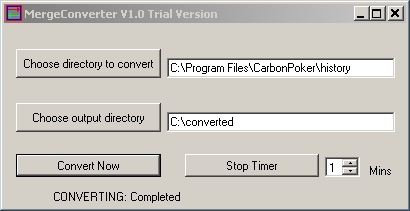
- 1.Extract the files in the zip folder received after purchase (right click, "extract all" or "extract files")
- 2.Create a Directory c:\converted (This is where all the converted files will go.)
- 3.Double Click MergeConverter.exe to start the converter.
- 4.Choose a target folder containing the hands you want to convert.
- 5.Then choose if you want the converted files to be place somewhere besides the default of C:\converted
- 6.Click "Convert Now" to convert files or "Auto Convert Every" to convert every X minutes, where you choose X.
- A status message appears at the bottom of the application showing which file is being converted and updates when all conversions are complete.
- The converted files will have there original name plus the number of the first hand converted in that file.
This is to avoid overwriting a previous converted file from a previous date when you are bulk converting. - 7. Import the converted files into Holdem Manager. The easiest way is to setup "C:\converted" as an auto import folder. To overlay the stats on your tables using the HUD use the table finder chooser in the table manager part of the HUD.
- Players of Omaha and Omaha Hi-Lo cash games on the Merge Network can find active discussions on the subjects on Cardschat - one of the most active poker and gaming forums for players on the web. Forums like this boast tens of thousands of player, talking about strategies, room comparisons and new technology and software.
NEWS
- Trial version now available.
- Merge Gaming have confirmed that use of the converter is allowed on the Merge Gaming Network.
- The full version of the converter now supports Omaha and Omaha Hi-Lo cash games.
- SNG Tournaments also supported for purchasers of full version.